
Remember me








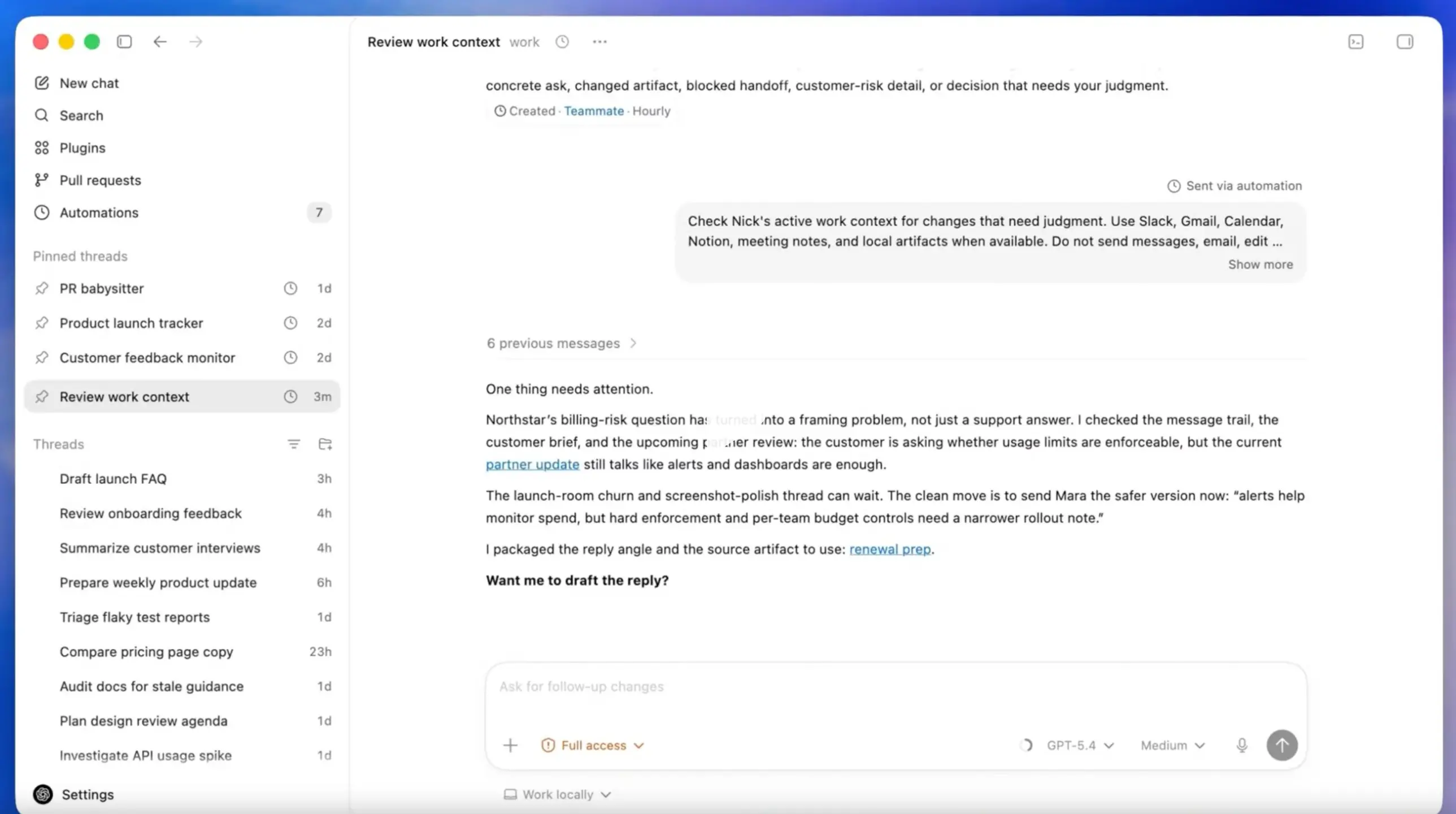
Codex has about 3 million weekly active users, but not all of them use the Codex app since Codex is also available via IDE plugins and CLI. OpenAI today announced a major update for the Codex app for Windows and Mac that will attract more developers by evolving from a simple GUI for LLM responses to a broader software development companion with support for computer use, image generation, and more.
This latest Codex app brings support for background computer use. With this capability, the Codex app can now see, click, and type on a user’s computer with its own cursor. This enables the Codex app to control a wide variety of apps that do not offer an API. Even better news is that multiple Codex agents can run in parallel on a Mac without interrupting the user’s own activity on the desktop.
Another useful feature for developers in this Codex update is the new in-app browser. With this capability, users can comment directly on web pages to give exact instructions to the agent for further modifications. In the future, Codex will be able to take fuller control of browser-based workflows beyond localhost web apps.
Previously, Codex didn't have native image generation support, forcing developers to use the ChatGPT app. With this update, native gpt-image-1.5 model integration will allow developers to create and refine images inside their coding workflow.
OpenAI today announced that it is adding 90 new plugins, including Atlassian Rovo, CircleCI, CodeRabbit, GitLab Issues, Microsoft Suite, Neon by Databricks, Remotion, Render, and Superpowers.
On the workflow side, Codex now supports GitHub review comments, multiple terminal tabs, and alpha support for connecting to remote devboxes over SSH. Developers can also open files directly in the sidebar with previews for PDFs, spreadsheets, slides, and documents. To keep developers updated about the ongoing work happening through agents, a new summary pane will feature agent plans, sources, and generated artifacts.
OpenAI is also expanding Codex automations. Developers can now reuse existing conversation threads so the assistant can preserve earlier context, and Codex can schedule future work for itself and resume long-running tasks across days or even weeks.
Finally, OpenAI is previewing a new memory feature for Codex that can retain useful context from earlier interactions, including preferences, corrections, and other details that took time to establish. Codex can also proactively suggest useful next steps by combining project context, connected plugins, and memory.
The above new Codex features are rolling out now to Codex desktop app users signed in with a ChatGPT account. The personalization features, such as memory and context-aware suggestions, will come later to Enterprise, Edu, and users in the EU and UK. The new Codex computer use feature will be available only on macOS for now.