
Remember me











Hackers are actively exploiting a maximum severity flaw in the Modular DS WordPress plugin that allows them to bypass authentication remotely and access the vulnerable sites with admin-level privileges.
The flaw, tracked as CVE-2026-23550, affects versions 2.5.1 and older of Modular DS, a management plugin that allows managing multiple WordPress sites from a single interface.
The plugin lets owners, developers, or hosting providers remotely monitor sites, perform updates, manage users, access server information, run maintenance tasks, and log in. Modular DS has more than 40,000 installations.

According to Patchstack researchers, CVE-2026-23550 is currently exploited in the wild, the first attacks being detected on January 13, around 02:00 UTC.
Patchstack confirmed the flaw and reached out to the vendor on the following day. Modular DS released a fix in version 2.5.2, only a few hours later.
The vulnerability is caused by a series of design and implementation flaws, including accepting requests as trusted when “direct request” mode is activated, without a cryptographic check of their origin. This behavior exposes multiple sensitive routes and activates an automatic admin login fallback mechanism.
If no specific user ID is provided in the request body, the plugin fetches an existing admin or super admin user, then logs in as that user automatically.
“In the controller src/app/Http/Controllers/AuthController.php, method getLogin(SiteRequest $modularRequest), the code attempts to read a user ID from the body of $modularRequest,” Patchstack explains.
“Since this code can be accessed by unauthenticated users because of the flaw previously explained, it allows an immediate privilege escalation,” the researchers say.
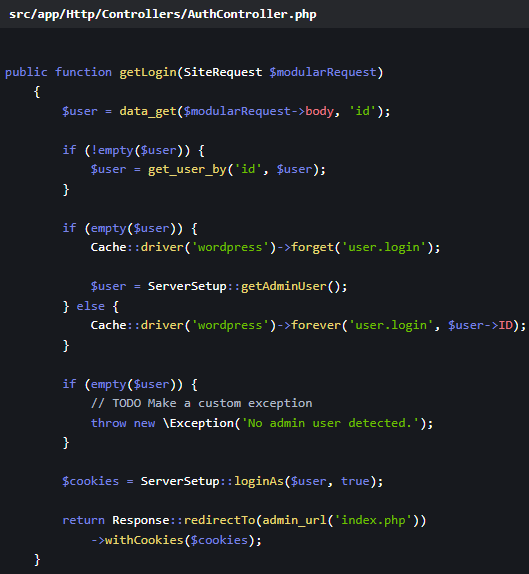 The flawed fallback logic
The patch in Modular DS version 2.5.2 removed URL-based route matching. It is now driven entirely by validated filter logic, added a default 404 route, only recognizes ‘type’ values for route binding, and includes a safe failure mode for unrecognized requests.
Users of Modular DS are recommended to upgrade to version 2.5.2 or later as soon as possible.
In a security bulletin, the vendor advises users to review server access logs for suspicious requests, check admin users for rogue additions, and regenerate all WordPress salts after updating to the most recent version.

Whether you're cleaning up old keys or setting guardrails for AI-generated code, this guide helps your team build securely from the start.
Get the cheat sheet and take the guesswork out of secrets management.