
Remember me

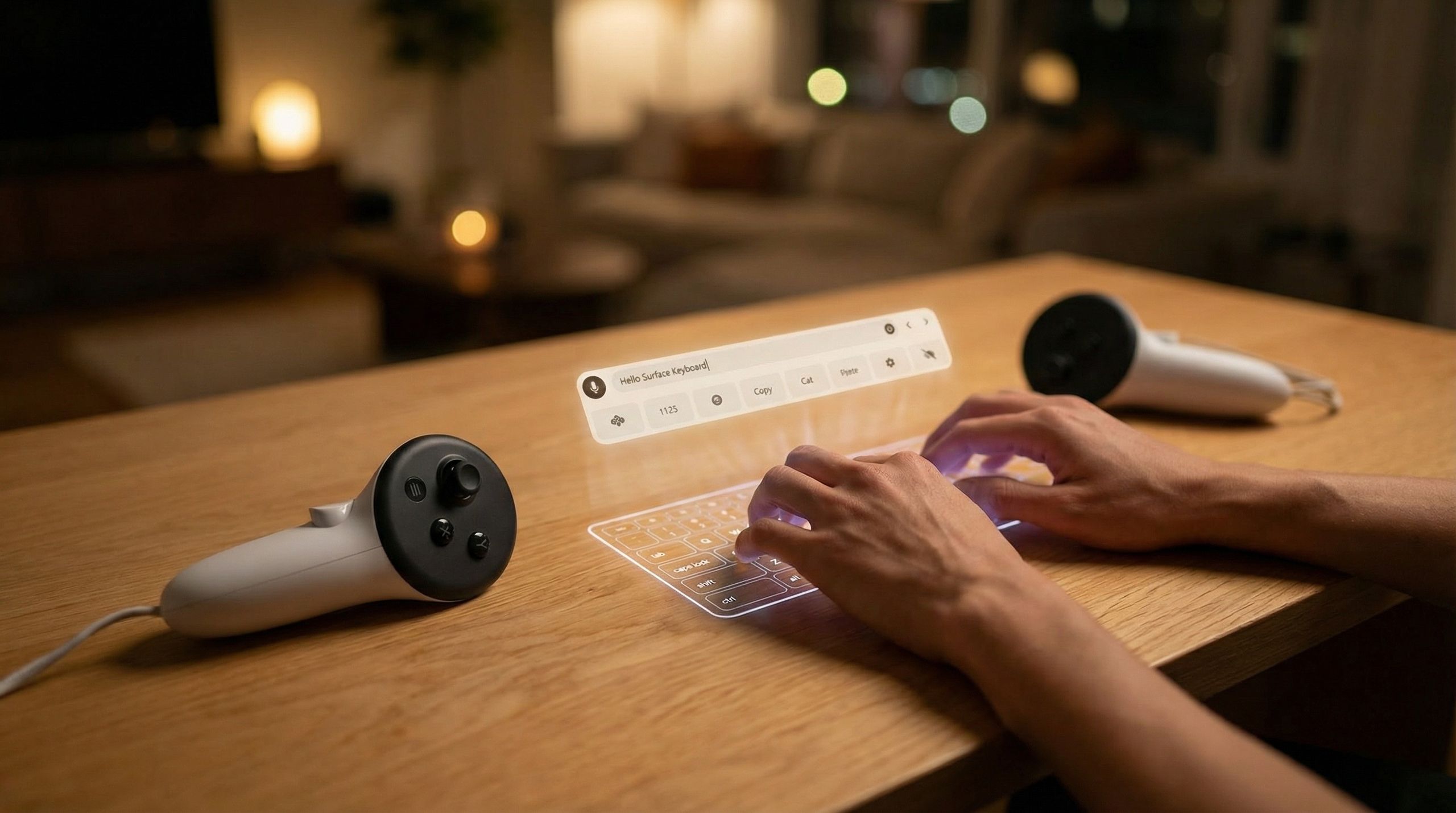




Meta just released a Surface Keyboard and Touchpad that could transform work within virtual reality. A new feature for the Meta Quest 3 allows you to use a virtual keyboard on any flat surface, such as a desk or table.
The new feature has nothing to do with Microsoft Surface, but it is a handy feature for those who want to get work done within VR.
You may like Don't miss the Quest 3S Black Friday deal: Essential VR for Xbox Cloud Gaming.
 I wasn't going to buy, but these Meta Quest 3S Cyber Monday deals are too good to pass up
 The 'Magic Trackpad for Windows' — my favorite gadget of 2025 — just got an official price and release window
A physical keyboard will still be better for typing in VR. The tactile feedback and ergonomics of a physical keyboard will beat typing directly on a desk or table in almost all circumstances. But the Surface Keyboard is a solid middle ground between a physical keyboard and an awkward floating digital one.
I would argue the touchpad functionality will make a bigger difference for those working in VR. Navigating the web or a virtual desktop by pinching your fingers in the air or swiping around your hands can be quite frustrating.
A video shared by Yoon Park, Principal Designer at Meta Reality Labs, shows smooth scrolling on the web with a gesture and navigating within Microsoft Word using the touchpad.
For context, take a look at the video below shared by my colleague Nicholas Sutrich. It was taken a couple of years ago to demonstrate the web versions of Office working on a Meta Quest 3.
You may like
Don't miss the Quest 3S Black Friday deal: Essential VR for Xbox Cloud Gaming.
I wasn't going to buy, but these Meta Quest 3S Cyber Monday deals are too good to pass up
The 'Magic Trackpad for Windows' — my favorite gadget of 2025 — just got an official price and release window
Sutrich's setup from back then had a physical keyboard on a desk. Near the end of the video, you'll see a floating keyboard pop up.
Here's how to sign up for Meta Quest PTC, as outlined in a Meta support document:
On your phone, open the Meta Horizon app.Tap Menu at the top of your Horizon Feed.Tap Devices.Select the headset you want to find to join Meta Quest PTC with.Tap Headset settings, then tap Advanced settings.Tap the toggle next to Public Test Channel to try to join Meta Quest PTC.If the toggle doesn't work, Meta Quest PTC is currently full and not available.

The Quest 3 is arguably the best consumer headset for gaming, but Meta is clearly pushing to make it a legitimate workstation. Does a virtual "Surface Keyboard" make you more likely to strap on a headset for work, or is VR destined to remain a gaming-only platform for you? Let us know in the comments.

Follow Windows Central on Google News to keep our latest news, insights, and features at the top of your feeds!