
Remember me




If you've been looking into self-hosted software, it won't take you long to realize that you can self-host just about anything. From self-hosted Notion alternatives to file storage servers that can run even on Android, the self-hosting world is full of hidden gems that can change the way you work.
And they can also change the way you approach your online privacy. Using a DNS-level blocker like Pi-hole, AdGuard, and more is a great way to protect your privacy and get a hold of who your devices are talking to. All self-hosted DNS servers you can find online are great at one thing or the other, but the Technitium DNS server is something I wish I had known about sooner.
 Related
I set up Pi-hole on my home network, and the internet feels like a completely different place
Related
I set up Pi-hole on my home network, and the internet feels like a completely different place
The many benefits of hosting your own DNS server and the control it gives you over your network.
The DNS server I wish I’d found earlier Technitium deserves way more attentionTechnitium DNS Server is a free, open-source program that runs as both an authoritative and recursive DNS server. What that means is that it can resolve domain names all the way from the root servers without forwarding queries to Google, Cloudflare, or your ISP. Your DNS traffic doesn't have to leave your network at all if you don't want to.
Since it's built on .NET, it runs on Windows, Linux, macOS, and even a Raspberry Pi. Similar to Pi-hole, installation is quite easy. All you have to do is run a simple curl command in your terminal:
 Screenshot by Yadullah Abidi | No Attribution Required.
curl -sSL https://download.technitium.com/dns/install.sh | sudo bash
Screenshot by Yadullah Abidi | No Attribution Required.
curl -sSL https://download.technitium.com/dns/install.sh | sudo bash Then follow the terminal setup wizard, and you're off to the races. You can also use the official Docker image to run it as a container, or download the Windows setup. You can even set it up as a virtual machine if that works better for you. Once installed, you'll find a browser-based web console running at port 5380 by default — no configuration file tinkering required.
DNS, blocking, and control — all in one placeIf you're just getting started with self-hosted DNS tools, you're likely running a stack: Pi-hole for blocking, Unbound for recursive resolution, and a separate DHCP server of some kind to keep it all together. I might have stopped my devices from phoning home with one simple DNS trick, but running a full DNS server required multiple tools. Technitium replaces all three tools at once and merges management into a single, clean interface.
The built-in recursive resolver means you can ditch Unbound. The built-in DHCP server handles IP assignment, complete with multiple scope support for VLANs. The ad-blocking also works much like Pi-hole: configure your blocklists, or pull popular block lists using the Quick Add dropdown in the Blocking settings, and you're good to go.
You don't need to worry much about performance either. The server can easily handle up to 100,000 DNS requests per second on regular consumer hardware, meaning your average home lab or low-power mini PC can comfortably handle anything your home network can throw at it.
Encrypted DNS, minus the hassle Built-in privacy without complicated setup Screenshot by Yadullah Abidi | No Attribution Required.
If you're running multiple self-hosted services on your local network, Technitium will allow you to create full DNS zones for your internal domain. Your NAS, home server, or media box can now have an A record, meaning you can type in simple names, instead of IP addresses. It's like accessing your usual websites, except you're running the server locally. It even handles reverse DNS zones automatically; when you create an A record for a zone, Technitium will offer to set up the corresponding PTR record in the reverse zone for you.
The DNS Apps feature extends this further with support for Split Horizon and Geolocation-based responses. If you've ever wanted the same domain name to resolve differently depending on whether you're inside or outside your home network, that's configurable without needing any unreliable workarounds. Wildcard subdomain support, record aging with automatic expiry, and the ability to enable or disable individual records for testing are all present.
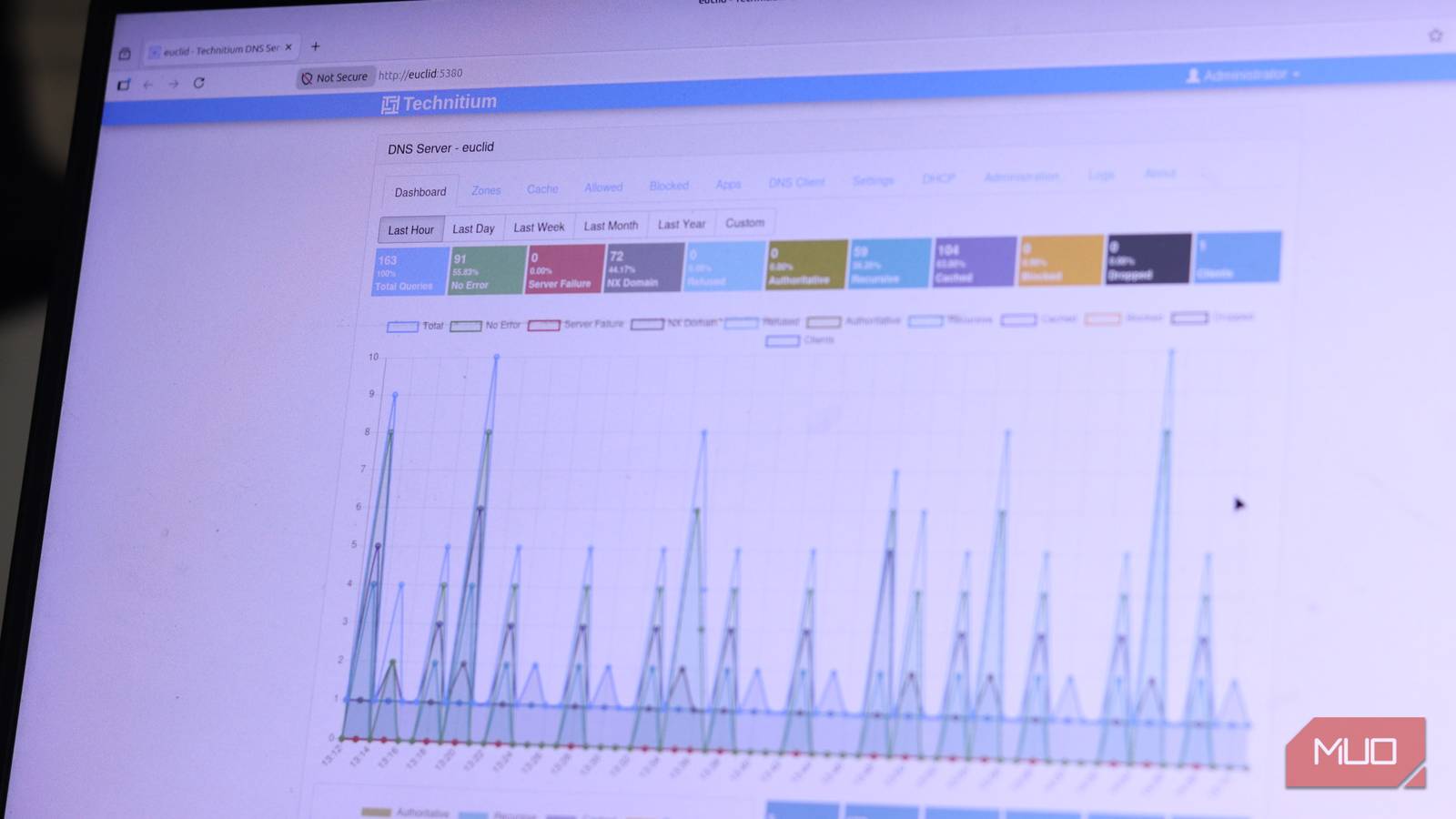
Control and visibility don't need extra apps Manage, monitor, and tweak everything in one UI Screenshot by Yadullah Abidi | No Attribution Required.
Technitium also has native clustering support, and if you've ever panicked when your single DNS instance went down, you'll really appreciate it.
Previously, managing two DNS servers meant dealing with zone transfers, synchronized configuration files, and manually keeping everything consistent across nodes. The clustering feature here, however, lets you manage multiple instances from a single administrative panel, with configuration changes syncing automatically across all nodes in the cluster. Allowed lists, blocked lists, DNS apps, and settings all propagate without any manual intervention.
For a homelab, that means running a primary instance on your main server and a secondary on a Raspberry Pi or older mini PC for redundancy. Changing anything, like a block list on one instance, updates the other automatically.
It’s not completely plug-and-play The setup quirks you should be ready for Yadullah Abidi / MakeUseOf
Adding all these features into one program increases the complexity, no matter how simple or intuitive the user interface feels. Technitium is less plug-and-play than AdGuard Home or even Pi-hole the first few times you use it. The concept of DNS zones, record types, and authoritative versus recursive resolution isn't something everyone knows by default, meaning you'll have to learn these concepts and understand what they do before you can start making any meaningful changes.
If you want simple ad-blocking and nothing else, Pi-hole is still your best bet. But if you've outgrown that simplicity, or you're already running multiple tools for DNS control, Technitium can compress pretty much your entire stack in a single tool that's much easier to manage.
This is a serious homelab upgrade It’s worth the effort once it’s runningOnce you start dabbling with DNS tools, you'll quickly find yourself with a pile of bolted-on tools as your expertise and requirements grow. You might have started with a neat Pi-hole configuration, but it'll quickly turn into a pile of multiple programs doing multiple things, trying to work together like a real DNS setup.
 Related
Technitium is the stack sanitization you need in this instance. It lets you replace multiple tools with one reliable, easy-to-use, and well-designed tool. It's not the most popular name in the self-hosted space, but if DNS has always been that one boring service you don't want to deal with, as was the case with me, Tecnitium can convince you otherwise.