
Remember me
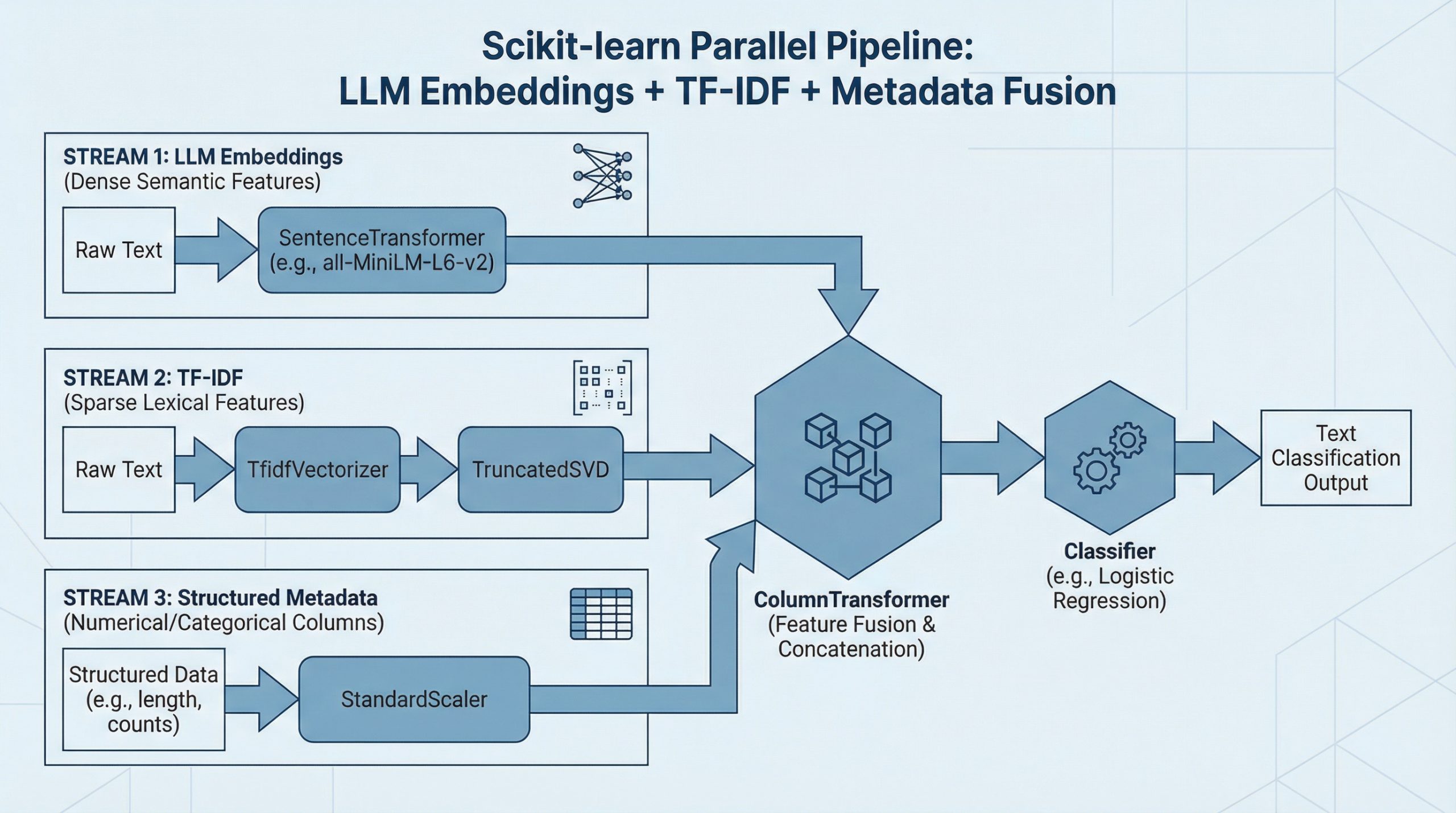

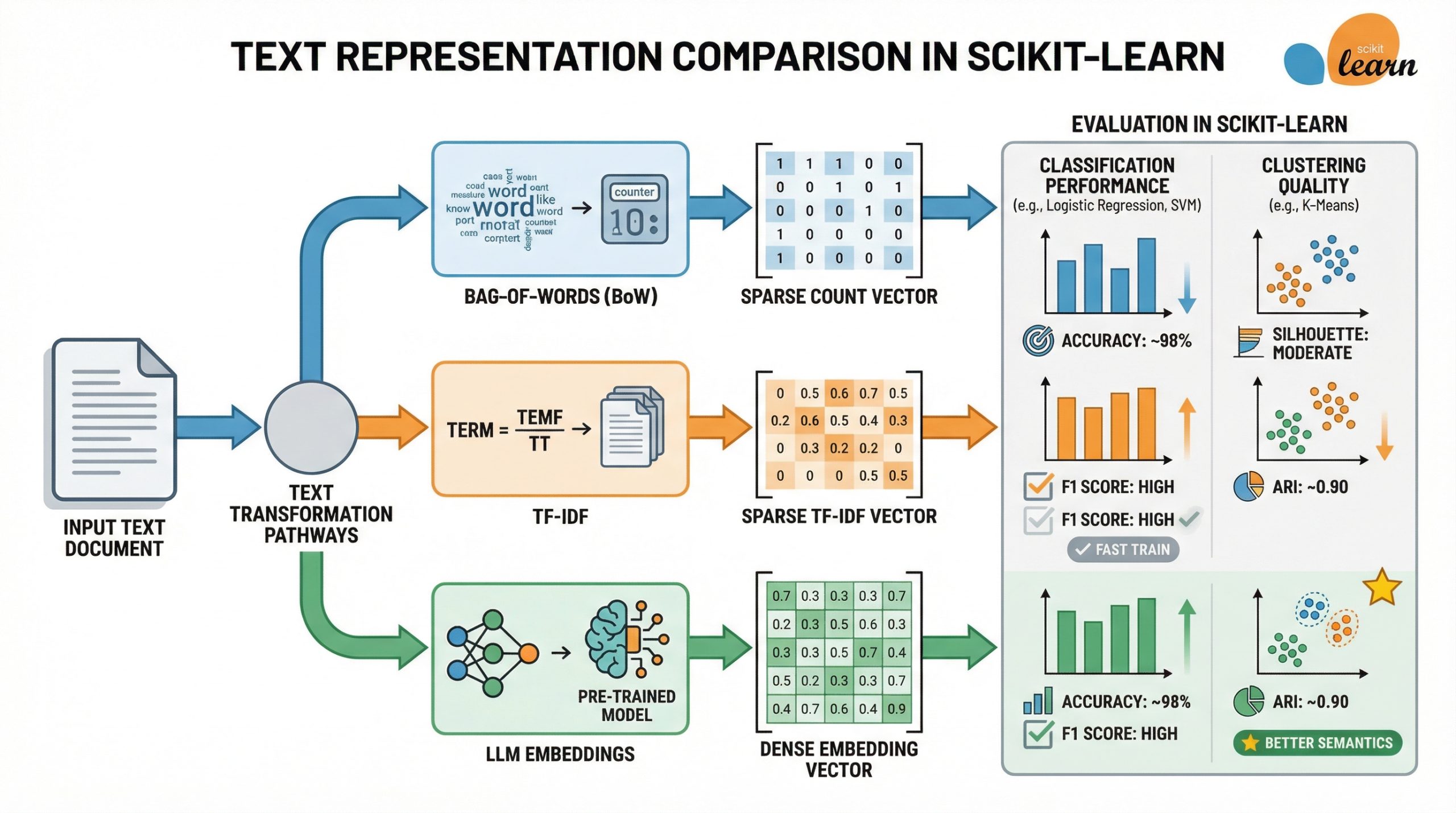

In this article, you will learn how Bag-of-Words, TF-IDF, and LLM-generated embeddings compare when used as text features for classification and clustering in scikit-learn.
Topics we will cover include:
How to generate Bag-of-Words, TF-IDF, and LLM embeddings for the same dataset. How these representations compare on text classification performance and training speed. How they behave differently for unsupervised document clustering.Let’s get right to it.
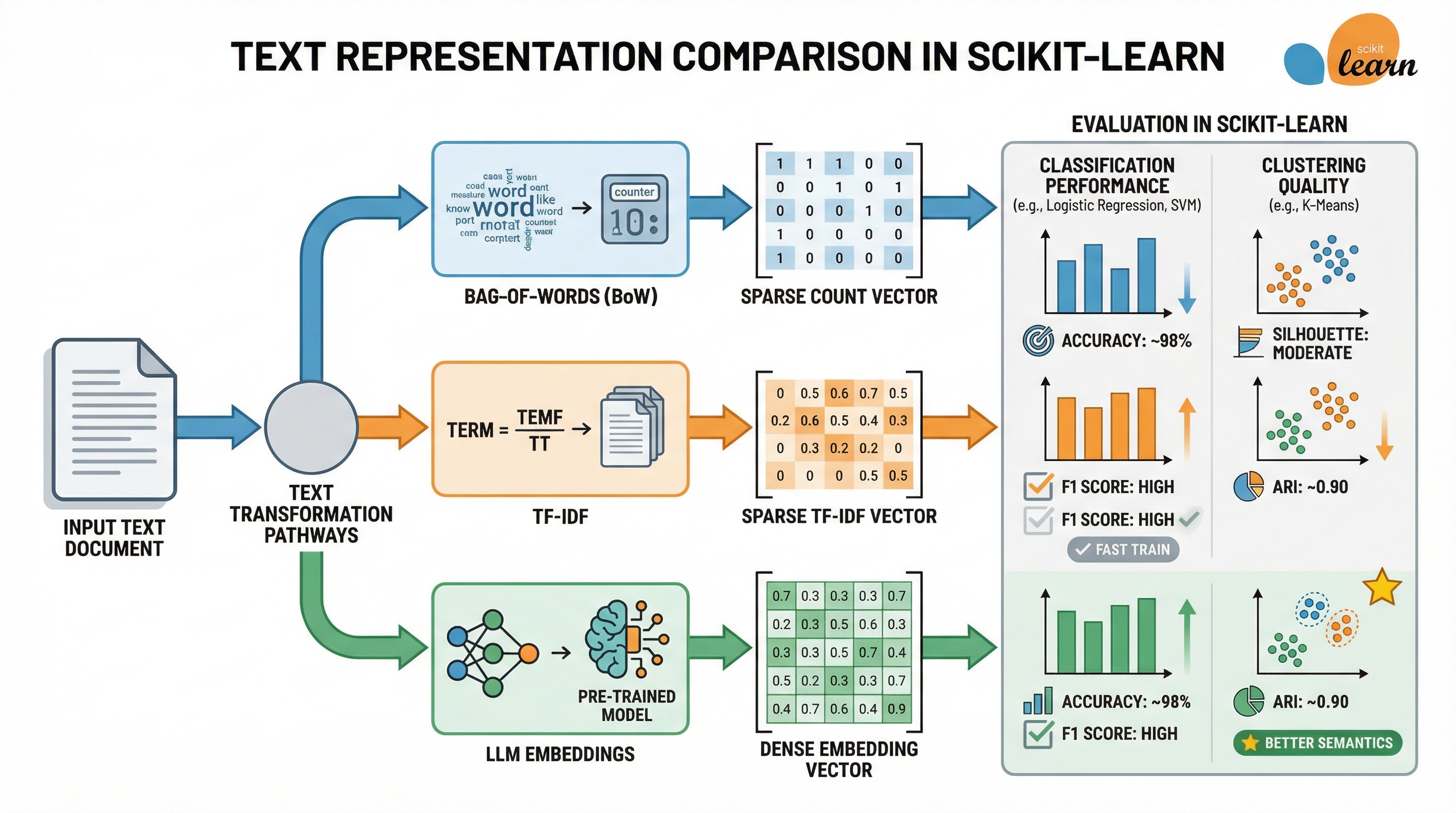
LLM Embeddings vs TF-IDF vs Bag-of-Words: Which Works Better in Scikit-learn? (click to enlarge)
Image by Author
Machine learning models built with frameworks like scikit-learn can accommodate unstructured data like text, as long as this raw text is converted into a numerical representation that is understandable by algorithms, models, and machines in a broader sense.
This article takes three well-known text representation approaches — TF-IDF, Bag-of-Words, and LLM-generated embeddings — to provide an analytical and example-based comparison between them, in the context of downstream machine learning modeling with scikit-learn.
For a glimpse of text representation approaches, including an introduction to the three used in this article, we recommend you take a look at this article and this one.
The article will first navigate you through a Python example where we will use the BBC news dataset — a labeled dataset containing a few thousand news articles categorized into five types — to obtain the three target representations for each text, build some text classifiers and compare them, and also build and compare some clustering models. After that, we adopt a more general and analytical perspective to discuss which approach is better — and when to use one or another.
Setup and Getting Text RepresentationsFirst, we import all the modules and libraries we will need, set up some configurations, and load the BBC news dataset:
import pandas as pd import numpy as np import matplotlib.pyplot as plt import seaborn as sns from time import time # Scikit-learn imports from sklearn.feature_extraction.text import CountVectorizer, TfidfVectorizer from sklearn.model_selection import train_test_split, cross_val_score from sklearn.linear_model import LogisticRegression from sklearn.ensemble import RandomForestClassifier from sklearn.svm import SVC from sklearn.cluster import KMeans from sklearn.metrics import ( accuracy_score, f1_score, classification_report, silhouette_score, adjusted_rand_score ) from sklearn.preprocessing import LabelEncoder # Our key import for building LLM embeddings: a Sentence Transformer model from sentence_transformers import SentenceTransformer # Plotting configuration - for later analyzing and comparing results sns.set_style("whitegrid") plt.rcParams['figure.figsize'] = (14, 6) # Loading BBC News dataset print("Loading BBC News dataset...") url = "https://storage.googleapis.com/dataset-uploader/bbc/bbc-text.csv" df = pd.read_csv(url) print(f"Dataset loaded: documents") print(f"Categories: ") print(f"\nClass distribution:") print(df['category'].value_counts())
1
2
3
4
5
6
7
8
9
10
11
12
13
14
15
16
17
18
19
20
21
22
23
24
25
26
27
28
29
30
31
32
33
34
35
import pandas as pd
import numpy as np
import matplotlib.pyplot as plt
import seaborn as sns
from time import time
# Scikit-learn imports
from sklearn.feature_extraction.text import CountVectorizer, TfidfVectorizer
from sklearn.model_selection import train_test_split, cross_val_score
from sklearn.linear_model import LogisticRegression
from sklearn.ensemble import RandomForestClassifier
from sklearn.svm import SVC
from sklearn.cluster import KMeans
from sklearn.metrics import (
accuracy_score, f1_score, classification_report,
silhouette_score, adjusted_rand_score
)
from sklearn.preprocessing import LabelEncoder
# Our key import for building LLM embeddings: a Sentence Transformer model
from sentence_transformers import SentenceTransformer
# Plotting configuration - for later analyzing and comparing results
sns.set_style("whitegrid")
plt.rcParams['figure.figsize'] = (14, 6)
# Loading BBC News dataset
print("Loading BBC News dataset...")
url = "https://storage.googleapis.com/dataset-uploader/bbc/bbc-text.csv"
df = pd.read_csv(url)
print(f"Dataset loaded: documents")
print(f"Categories: ")
print(f"\nClass distribution:")
print(df['category'].value_counts())
At the time of writing, the dataset version we are using contains 2225 instances, that is, documents containing news articles.
Since we will train some supervised machine learning models for classification later on, before obtaining the three representations for our text data, we separate the input texts from their labels and split the whole dataset into training and test subsets:
print("\n" + "="*70) print("DATA PREPARATION PRIOR TO GENERATING TEXT REPRESENTATIONS") print("="*70) texts = df['text'].tolist() labels = df['category'].tolist() # Encoding labels for classification le = LabelEncoder() y = le.fit_transform(labels) # Splitting data (same split for all representation methods and ML models trained later) X_text_train, X_text_test, y_train, y_test = train_test_split( texts, y, test_size=0.2, random_state=42, stratify=y ) print(f"\nTrain set: | Test set: ")
1
2
3
4
5
6
7
8
9
10
11
12
13
14
15
16
17
print("\n" + "="*70)
print("DATA PREPARATION PRIOR TO GENERATING TEXT REPRESENTATIONS")
print("="*70)
texts = df['text'].tolist()
labels = df['category'].tolist()
# Encoding labels for classification
le = LabelEncoder()
y = le.fit_transform(labels)
# Splitting data (same split for all representation methods and ML models trained later)
X_text_train, X_text_test, y_train, y_test = train_test_split(
texts, y, test_size=0.2, random_state=42, stratify=y
)
print(f"\nTrain set: | Test set: ")
Representation 1: Bag-of-Words (BoW)
print("\n[1] Bag-of-Words...") start = time() # The CountVectorizer class is used to apply BoW bow_vectorizer = CountVectorizer( max_features=5000, min_df=2, stop_words='english' ) X_bow_train = bow_vectorizer.fit_transform(X_text_train) X_bow_test = bow_vectorizer.transform(X_text_test) bow_time = time() - start print(f" Done in s") print(f" Shape: (documents × vocabulary)") print(f" Sparsity: %") print(f" Memory: KB")
1
2
3
4
5
6
7
8
9
10
11
12
13
14
15
16
17
18
19
print("\n[1] Bag-of-Words...")
start = time()
# The CountVectorizer class is used to apply BoW
bow_vectorizer = CountVectorizer(
max_features=5000,
min_df=2,
stop_words='english'
)
X_bow_train = bow_vectorizer.fit_transform(X_text_train)
X_bow_test = bow_vectorizer.transform(X_text_test)
bow_time = time() - start
print(f" Done in s")
print(f" Shape: (documents × vocabulary)")
print(f" Sparsity: %")
print(f" Memory: KB")
Representation 2: TF-IDF
print("\n[2] TF-IDF...") start = time() # Using TfidfVectorizer class to apply TF-IDF based on word frequencies tfidf_vectorizer = TfidfVectorizer( max_features=5000, min_df=2, stop_words='english' ) X_tfidf_train = tfidf_vectorizer.fit_transform(X_text_train) X_tfidf_test = tfidf_vectorizer.transform(X_text_test) tfidf_time = time() - start print(f" Done in s") print(f" Shape: ") print(f" Sparsity: %") print(f" Memory: KB")
1
2
3
4
5
6
7
8
9
10
11
12
13
14
15
16
17
18
19
print("\n[2] TF-IDF...")
start = time()
# Using TfidfVectorizer class to apply TF-IDF based on word frequencies
tfidf_vectorizer = TfidfVectorizer(
max_features=5000,
min_df=2,
stop_words='english'
)
X_tfidf_train = tfidf_vectorizer.fit_transform(X_text_train)
X_tfidf_test = tfidf_vectorizer.transform(X_text_test)
tfidf_time = time() - start
print(f" Done in s")
print(f" Shape: ")
print(f" Sparsity: %")
print(f" Memory: KB")
Representation 3: LLM Embeddings
print("\n[3] LLM Embeddings...") start = time() # Loading a pre-trained sentence transformer model to generate 384-dimensional embeddings embedding_model = SentenceTransformer('all-MiniLM-L6-v2') X_emb_train = embedding_model.encode( X_text_train, show_progress_bar=True, batch_size=32 ) X_emb_test = embedding_model.encode( X_text_test, show_progress_bar=False, batch_size=32 ) emb_time = time() - start print(f" Done in s") print(f" Shape: (documents × embedding_dim)") print(f" Sparsity: 0.0% (dense representation)") print(f" Memory: KB")
1
2
3
4
5
6
7
8
9
10
11
12
13
14
15
16
17
18
19
20
21
22
23
print("\n[3] LLM Embeddings...")
start = time()
# Loading a pre-trained sentence transformer model to generate 384-dimensional embeddings
embedding_model = SentenceTransformer('all-MiniLM-L6-v2')
X_emb_train = embedding_model.encode(
X_text_train,
show_progress_bar=True,
batch_size=32
)
X_emb_test = embedding_model.encode(
X_text_test,
show_progress_bar=False,
batch_size=32
)
emb_time = time() - start
print(f" Done in s")
print(f" Shape: (documents × embedding_dim)")
print(f" Sparsity: 0.0% (dense representation)")
print(f" Memory: KB")
Comparison 1: Text ClassificationThat was a thorough preparatory stage! Now we are ready for a first comparison example, focused on training several types of machine learning classifiers and comparing how each type of classifier performs when trained on one text representation or another.
In a nutshell, the code provided below will:
Consider three classifier types: logistic regression, random forests, and support vector machines (SVM). Train and evaluate each of the 3×3 = 9 classifiers trained, using two evaluation metrics: accuracy and F1 score. List and visualize the results obtained from each model type and text representation approach used.print("\n" + "="*70) print("COMPARISON 1: SUPERVISED CLASSIFICATION") print("="*70) # Defining the three types of classifiers to train classifiers = # Storing results in a Python collection (list) classification_results = [] # Evaluating each representation with each classifier representations = for rep_name, (X_tr, X_te) in representations.items(): print(f"\nTesting :") print("-" * 50) for clf_name, clf in classifiers.items(): # Train start = time() clf.fit(X_tr, y_train) train_time = time() - start # Predict start = time() y_pred = clf.predict(X_te) pred_time = time() - start # Evaluate acc = accuracy_score(y_test, y_pred) f1 = f1_score(y_test, y_pred, average='weighted') print(f" | Acc: | F1: | Train: s") classification_results.append() # Converting results to DataFrame for interpretability and easier comparison results_df = pd.DataFrame(classification_results)
1
2
3
4
5
6
7
8
9
10
11
12
13
14
15
16
17
18
19
20
21
22
23
24
25
26
27
28
29
30
31
32
33
34
35
36
37
38
39
40
41
42
43
44
45
46
47
48
49
50
51
52
53
print("\n" + "="*70)
print("COMPARISON 1: SUPERVISED CLASSIFICATION")
print("="*70)
# Defining the three types of classifiers to train
classifiers =
# Storing results in a Python collection (list)
classification_results = []
# Evaluating each representation with each classifier
representations =
for rep_name, (X_tr, X_te) in representations.items():
print(f"\nTesting :")
print("-" * 50)
for clf_name, clf in classifiers.items():
# Train
start = time()
clf.fit(X_tr, y_train)
train_time = time() - start
# Predict
start = time()
y_pred = clf.predict(X_te)
pred_time = time() - start
# Evaluate
acc = accuracy_score(y_test, y_pred)
f1 = f1_score(y_test, y_pred, average='weighted')
print(f" | Acc: | F1: | Train: s")
classification_results.append()
# Converting results to DataFrame for interpretability and easier comparison
results_df = pd.DataFrame(classification_results)
Output:
====================================================================== COMPARISON 1: SUPERVISED CLASSIFICATION ====================================================================== Testing BoW: -------------------------------------------------- Logistic Regression | Acc: 0.982 | F1: 0.982 | Train: 0.86s Random Forest | Acc: 0.973 | F1: 0.973 | Train: 2.20s SVM | Acc: 0.984 | F1: 0.984 | Train: 2.02s Testing TF-IDF: -------------------------------------------------- Logistic Regression | Acc: 0.984 | F1: 0.984 | Train: 0.52s Random Forest | Acc: 0.978 | F1: 0.977 | Train: 1.79s SVM | Acc: 0.987 | F1: 0.987 | Train: 2.99s Testing LLM Embeddings: -------------------------------------------------- Logistic Regression | Acc: 0.982 | F1: 0.982 | Train: 0.27s Random Forest | Acc: 0.960 | F1: 0.959 | Train: 5.21s SVM | Acc: 0.980 | F1: 0.980 | Train: 0.15s
1
2
3
4
5
6
7
8
9
10
11
12
13
14
15
16
17
18
19
20
21
======================================================================
COMPARISON 1: SUPERVISED CLASSIFICATION
======================================================================
Testing BoW:
--------------------------------------------------
Logistic Regression | Acc: 0.982 | F1: 0.982 | Train: 0.86s
Random Forest | Acc: 0.973 | F1: 0.973 | Train: 2.20s
SVM | Acc: 0.984 | F1: 0.984 | Train: 2.02s
Testing TF-IDF:
--------------------------------------------------
Logistic Regression | Acc: 0.984 | F1: 0.984 | Train: 0.52s
Random Forest | Acc: 0.978 | F1: 0.977 | Train: 1.79s
SVM | Acc: 0.987 | F1: 0.987 | Train: 2.99s
Testing LLM Embeddings:
--------------------------------------------------
Logistic Regression | Acc: 0.982 | F1: 0.982 | Train: 0.27s
Random Forest | Acc: 0.960 | F1: 0.959 | Train: 5.21s
SVM | Acc: 0.980 | F1: 0.980 | Train: 0.15s
Input code for visualizing results:
# Creating visualization plots for direct comparison fig, axes = plt.subplots(1, 2, figsize=(16, 6)) # Plot 1: Accuracy comparison pivot_acc = results_df.pivot(index='Classifier', columns='Representation', values='Accuracy') pivot_acc.plot(kind='bar', ax=axes[0], width=0.8) axes[0].set_title('Classification Accuracy by Representation', fontsize=14, fontweight='bold') axes[0].set_ylabel('Accuracy') axes[0].set_xlabel('Classifier') axes[0].legend(title='Representation') axes[0].grid(axis='y', alpha=0.3) axes[0].set_ylim([0.9, 1.0]) # Plot 2: Training time comparison pivot_time = results_df.pivot(index='Classifier', columns='Representation', values='Train Time') pivot_time.plot(kind='bar', ax=axes[1], width=0.8, color=['#1f77b4', '#ff7f0e', '#2ca02c']) axes[1].set_title('Training Time by Representation', fontsize=14, fontweight='bold') axes[1].set_ylabel('Time (seconds)') axes[1].set_xlabel('Classifier') axes[1].legend(title='Representation') axes[1].grid(axis='y', alpha=0.3) plt.tight_layout() plt.show() # Identifying best performers print("\nBEST PERFORMERS:") print("-" * 50) best_acc = results_df.loc[results_df['Accuracy'].idxmax()] print(f"Best Accuracy: + = ") fastest = results_df.loc[results_df['Train Time'].idxmin()] print(f"Fastest Training: + = s")
1
2
3
4
5
6
7
8
9
10
11
12
13
14
15
16
17
18
19
20
21
22
23
24
25
26
27
28
29
30
31
32
33
# Creating visualization plots for direct comparison
fig, axes = plt.subplots(1, 2, figsize=(16, 6))
# Plot 1: Accuracy comparison
pivot_acc = results_df.pivot(index='Classifier', columns='Representation', values='Accuracy')
pivot_acc.plot(kind='bar', ax=axes[0], width=0.8)
axes[0].set_title('Classification Accuracy by Representation', fontsize=14, fontweight='bold')
axes[0].set_ylabel('Accuracy')
axes[0].set_xlabel('Classifier')
axes[0].legend(title='Representation')
axes[0].grid(axis='y', alpha=0.3)
axes[0].set_ylim([0.9, 1.0])
# Plot 2: Training time comparison
pivot_time = results_df.pivot(index='Classifier', columns='Representation', values='Train Time')
pivot_time.plot(kind='bar', ax=axes[1], width=0.8, color=['#1f77b4', '#ff7f0e', '#2ca02c'])
axes[1].set_title('Training Time by Representation', fontsize=14, fontweight='bold')
axes[1].set_ylabel('Time (seconds)')
axes[1].set_xlabel('Classifier')
axes[1].legend(title='Representation')
axes[1].grid(axis='y', alpha=0.3)
plt.tight_layout()
plt.show()
# Identifying best performers
print("\nBEST PERFORMERS:")
print("-" * 50)
best_acc = results_df.loc[results_df['Accuracy'].idxmax()]
print(f"Best Accuracy: + = ")
fastest = results_df.loc[results_df['Train Time'].idxmin()]
print(f"Fastest Training: + = s")
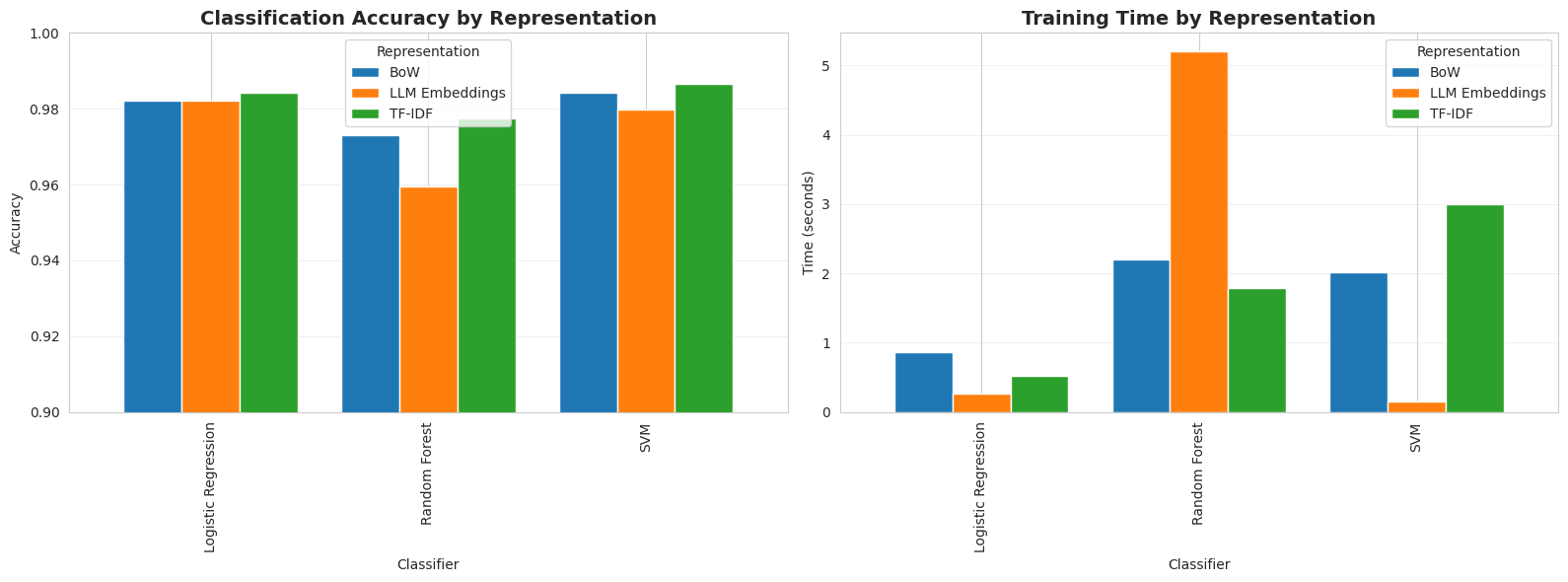
Let’s take these results with a pinch of salt, as they are specific to the dataset and model types trained, and by no means generalizable. TF-IDF combined with an SVM classifier led to the best accuracy (0.987), while LLM embeddings with SVM yielded the fastest model to train (0.15s). Meanwhile, the best overall combination in terms of performance-speed balance is logistic regression with TF-IDF, with a nearly perfect accuracy of 0.984 and a very fast training time of 0.52s.
Why did LLM embeddings, supposedly the most advanced of the three text representation approaches, not provide the best performance? There are several reasons for this. First, the existing five classes (news categories) in the BBC news dataset are strongly word-discriminative; in other words, they are easily separable by class, so moderately simpler representations like TF-IDF are enough to capture these patterns very well. This also implies there is little need for the deep semantic understanding that LLM embeddings achieve; in fact, this can sometimes be counterproductive and lead to overfitting. In addition, because of the near separability between news types, linear and simpler models work great, compared to complex ones like random forests.
If we had a more challenging, real-world dataset than BBC news, with issues like noise, paraphrasing, slang, or even cross-lingual data, LLM embeddings would probably outperform the other two representations.
Regarding Bag-of-Words, in this scenario it only marginally outperforms in terms of inference speed, so it is mainly recommended for very simple tasks requiring maximum interpretability, or as part of a baseline model before trying other strategies.
Comparison 2: Document ClusteringWe will consider a second scenario: applying k-means clustering with k=5 and comparing the cluster quality across the three text representation schemes. Notice in the code below that, since clustering is an unsupervised task not requiring labels or train-test splitting, we will re-generate all three representations again for the whole dataset.
print("\n" + "="*70) print("COMPARISON 2: DOCUMENT CLUSTERING") print("="*70) # Using full dataset for clustering (no train/test split needed) all_texts = texts all_labels = y # Generating representations once more print("\nGenerating representations for full dataset...") X_bow_full = bow_vectorizer.fit_transform(all_texts) X_tfidf_full = tfidf_vectorizer.fit_transform(all_texts) X_emb_full = embedding_model.encode(all_texts, show_progress_bar=True, batch_size=32) # Clustering with K-Means (k=5, matching ground-truth categories) n_clusters = len(np.unique(all_labels)) clustering_results = [] representations_full = for rep_name, X_full in representations_full.items(): print(f"\nClustering with :") start = time() kmeans = KMeans(n_clusters=n_clusters, random_state=42, n_init=10) cluster_labels = kmeans.fit_predict(X_full) cluster_time = time() - start # Evaluate silhouette = silhouette_score(X_full, cluster_labels) ari = adjusted_rand_score(all_labels, cluster_labels) print(f" Silhouette Score: ") print(f" Adjusted Rand Index: ") print(f" Time: s") clustering_results.append() clustering_df = pd.DataFrame(clustering_results)
1
2
3
4
5
6
7
8
9
10
11
12
13
14
15
16
17
18
19
20
21
22
23
24
25
26
27
28
29
30
31
32
33
34
35
36
37
38
39
40
41
42
43
44
45
46
47
48
49
print("\n" + "="*70)
print("COMPARISON 2: DOCUMENT CLUSTERING")
print("="*70)
# Using full dataset for clustering (no train/test split needed)
all_texts = texts
all_labels = y
# Generating representations once more
print("\nGenerating representations for full dataset...")
X_bow_full = bow_vectorizer.fit_transform(all_texts)
X_tfidf_full = tfidf_vectorizer.fit_transform(all_texts)
X_emb_full = embedding_model.encode(all_texts, show_progress_bar=True, batch_size=32)
# Clustering with K-Means (k=5, matching ground-truth categories)
n_clusters = len(np.unique(all_labels))
clustering_results = []
representations_full =
for rep_name, X_full in representations_full.items():
print(f"\nClustering with :")
start = time()
kmeans = KMeans(n_clusters=n_clusters, random_state=42, n_init=10)
cluster_labels = kmeans.fit_predict(X_full)
cluster_time = time() - start
# Evaluate
silhouette = silhouette_score(X_full, cluster_labels)
ari = adjusted_rand_score(all_labels, cluster_labels)
print(f" Silhouette Score: ")
print(f" Adjusted Rand Index: ")
print(f" Time: s")
clustering_results.append()
clustering_df = pd.DataFrame(clustering_results)
Output:
Clustering with BoW: Silhouette Score: 0.124 Adjusted Rand Index: 0.102 Time: 1.19s Clustering with TF-IDF: Silhouette Score: 0.016 Adjusted Rand Index: 0.698 Time: 0.94s Clustering with LLM Embeddings: Silhouette Score: 0.066 Adjusted Rand Index: 0.899 Time: 0.41s
Clustering with BoW:
Silhouette Score: 0.124
Adjusted Rand Index: 0.102
Time: 1.19s
Clustering with TF-IDF:
Silhouette Score: 0.016
Adjusted Rand Index: 0.698
Time: 0.94s
Clustering with LLM Embeddings:
Silhouette Score: 0.066
Adjusted Rand Index: 0.899
Time: 0.41s
Code for visualizing results:
# Creating comparison plots fig, axes = plt.subplots(1, 2, figsize=(14, 5)) # Plot 1: Clustering quality metrics x = np.arange(len(clustering_df)) width = 0.35 axes[0].bar(x - width/2, clustering_df['Silhouette'], width, label='Silhouette', alpha=0.8) axes[0].bar(x + width/2, clustering_df['ARI'], width, label='Adjusted Rand Index', alpha=0.8) axes[0].set_xlabel('Representation') axes[0].set_ylabel('Score') axes[0].set_title('Clustering Quality Metrics', fontsize=14, fontweight='bold') axes[0].set_xticks(x) axes[0].set_xticklabels(clustering_df['Representation']) axes[0].legend() axes[0].grid(axis='y', alpha=0.3) # Plot 2: Clustering time axes[1].bar(clustering_df['Representation'], clustering_df['Time'], color=['#1f77b4', '#ff7f0e', '#2ca02c'], alpha=0.8) axes[1].set_xlabel('Representation') axes[1].set_ylabel('Time (seconds)') axes[1].set_title('Clustering Computation Time', fontsize=14, fontweight='bold') axes[1].grid(axis='y', alpha=0.3) plt.tight_layout() plt.show() print("\nBEST CLUSTERING PERFORMER:") print("-" * 50) best_cluster = clustering_df.loc[clustering_df['ARI'].idxmax()] print(f": ARI = , Silhouette = ")
1
2
3
4
5
6
7
8
9
10
11
12
13
14
15
16
17
18
19
20
21
22
23
24
25
26
27
28
29
30
31
# Creating comparison plots
fig, axes = plt.subplots(1, 2, figsize=(14, 5))
# Plot 1: Clustering quality metrics
x = np.arange(len(clustering_df))
width = 0.35
axes[0].bar(x - width/2, clustering_df['Silhouette'], width, label='Silhouette', alpha=0.8)
axes[0].bar(x + width/2, clustering_df['ARI'], width, label='Adjusted Rand Index', alpha=0.8)
axes[0].set_xlabel('Representation')
axes[0].set_ylabel('Score')
axes[0].set_title('Clustering Quality Metrics', fontsize=14, fontweight='bold')
axes[0].set_xticks(x)
axes[0].set_xticklabels(clustering_df['Representation'])
axes[0].legend()
axes[0].grid(axis='y', alpha=0.3)
# Plot 2: Clustering time
axes[1].bar(clustering_df['Representation'], clustering_df['Time'], color=['#1f77b4', '#ff7f0e', '#2ca02c'], alpha=0.8)
axes[1].set_xlabel('Representation')
axes[1].set_ylabel('Time (seconds)')
axes[1].set_title('Clustering Computation Time', fontsize=14, fontweight='bold')
axes[1].grid(axis='y', alpha=0.3)
plt.tight_layout()
plt.show()
print("\nBEST CLUSTERING PERFORMER:")
print("-" * 50)
best_cluster = clustering_df.loc[clustering_df['ARI'].idxmax()]
print(f": ARI = , Silhouette = ")
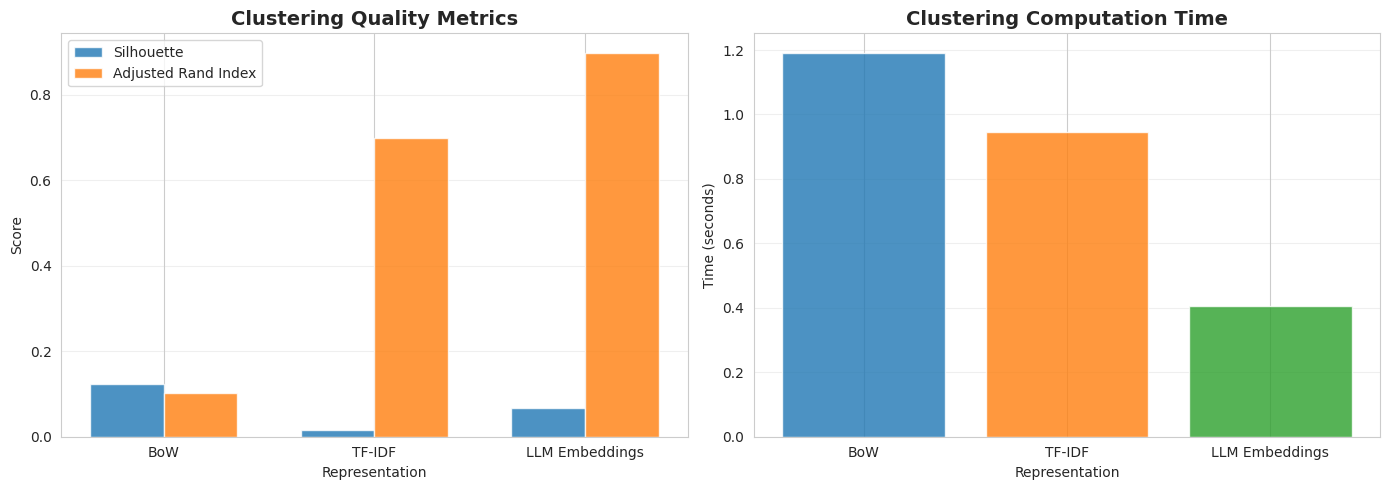
LLM embeddings won this time, with an ARI score of 0.899, showing strong alignment between clusters found and real subgroups that abide by true document categories. This is largely because clustering is an unsupervised learning task and, unlike classification, this is a territory where semantic understanding like that provided by embeddings becomes far more important for capturing patterns, even on simpler datasets.
SummarySimpler, well-behaved datasets like BBC news are a great example of a problem where advanced and LLM-based representations like embeddings do not always win. Traditional natural language processing approaches for text representation may excel in problems with clear class boundaries, linear separability, and clean, formal text without noisy patterns.
In sum, when addressing real-world machine learning projects, consider always starting with simpler baselines and keyword-based representations like TF-IDF, before directly jumping into state-of-the-art or most advanced strategies. The smaller your challenge, the lighter the outfit you need to dress it with that perfect machine learning look!
Comments (0)