
Remember me






I've loved journaling on paper for as long as I can remember. As a child, I was always on the lookout for diaries that looked cute, the kind you want to pour your thoughts into without overthinking. Those pages were filled with half-formed ideas, random doodles, and whatever was on my mind at the time. I am not exaggerating when I say I have filled over 20 diaries growing up, journaling and sketching my way through different phases of childhood.
It also became a quiet tradition at home. Every new year, my parents would gift me a fresh diary, and even now, this gesture means a lot. It showed they understood how deeply attached I was to journaling as a source of comfort. There is something irreplaceable about pen meeting paper, and that feeling still holds a place in my heart.
That said, as technology continues to seep into every part of our lives, it is only natural to adapt, at least a little. I have never been fully sold on digital journaling. Typing out thoughts just does not hit the same way. But this AI-powered journaling app caught me off guard. I went in with low expectations and came out pleasantly surprised by how thoughtfully it fit into the journaling process.
So, if you're someone who's just as nerdy and sentimental about journaling as I am, someone who loves the idea of capturing thoughts, memories, and moods, you will want to hear about this. This one is definitely worth your attention.
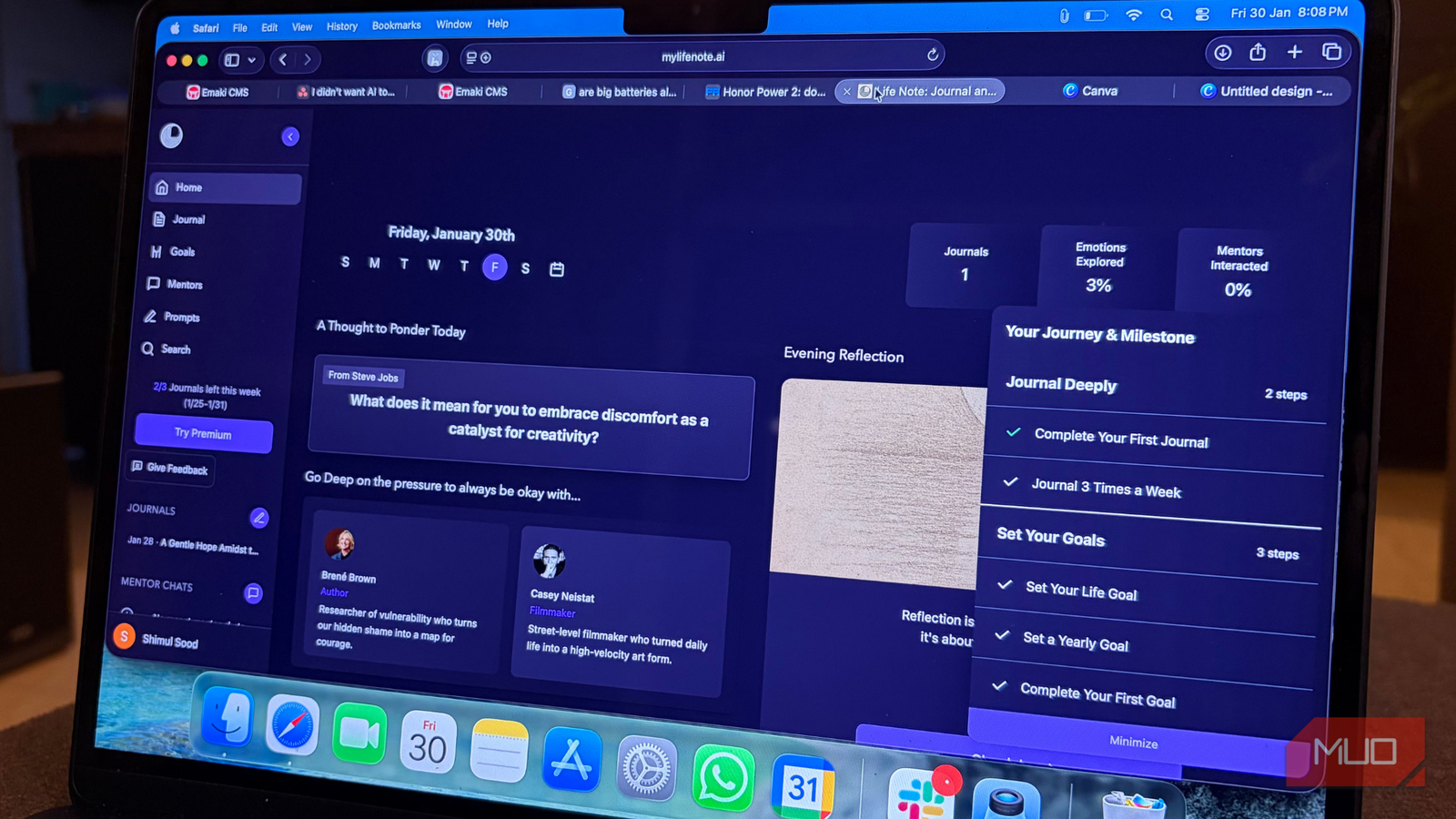
What's Life Note all about? A private way to write, reflect, and grow Credit: Shimul Sood / MakeUseOf
Life Note is an AI-powered journaling app that lets you write down your thoughts freely while also serving as a personal growth companion. At its core, it preserves the traditional feel of journaling, where you simply write whatever is on your mind. The difference is that an interactive AI sits alongside you, helping you reflect, understand patterns, and grow over time.
The app offers insights, guidance, and fresh perspectives through AI mentors inspired by well-known historical figures. As you write, the AI can support self-reflection, goal-setting, and ask you thoughtful questions. This makes the overall process feel more intentional, especially on days when you are unsure of what to write or how to process certain thoughts.
What really stands out is the personalized guidance. Life Note adapts to your entries and offers advice to help manage negative thinking, encourage positive habits, and support a healthier mindset. If you ever feel stuck or fall back into old patterns, the AI keeps track of your progress and nudges you in the right direction. The structured question-and-answer format helps you dig deeper into your thoughts, leading to stronger self-awareness over time.
If privacy is a concern, there is nothing to worry about. Life Note uses strong AES-GCM encryption to keep your journal entries private and secure at all times.
AES-GCM, or Advanced Encryption Standard in Galois Counter Mode, is a high-performance encryption method that ensures both data confidentiality and authenticity. Simply put, your thoughts stay yours, safe from prying eyes.
What this app has felt like for me More than writing, it felt like being heard Credit: Shimul Sood / MakeUseOf
Before jumping right into my experience, it's important to know where you can actually use Life Note. The app is available on the web and can also be downloaded from the App Store on iPhone or the Google Play Store on Android. There's even an option to join its Discord community if you want to connect with others. Personally, I prefer a big canvas when I journal, so starting on the web felt like an obvious choice. That extra space makes a difference. When I am traveling, I switch to journaling on my iPhone, although I'll admit it doesn't feel quite as enjoyable as writing on a larger screen.
Getting started on the web felt refreshingly simple. First, select the language you're comfortable with, then choose your primary goal for journaling. There are six options to pick from, and I went with Creativity. What I liked is that the choice isn't permanent. You can change it anytime, which makes sense because goals shift as life evolves. After that, the apps walk you through a few Did You Know prompts about journaling. Even if you already journal regularly, I'd still recommend reading through them. They help set the tone and give a better understanding of how Life Note approaches the process.
Once that's done, you're ready to write. The interface is clean and unintimidating, which makes it easy to start. While journaling, you can select your Wisdom Council, essentially your AI mentor. I chose Steve Jobs, mainly because of my interest in technology, but you can pick whoever resonates with you. At the bottom of the writing area, you'll also find options to get inspired by adding your own journal prompt or linking your entry to a personal goal. These features are simple but very useful when you need a bit of direction.
After you're done writing, all you have to do is click Save in the bottom-right corner. This approach is exactly what surprised me. Your chosen mentor then analyzes your entry and responds with a personalized message based on what you've written. Reading that message left me feeling shocked, surprised, and oddly comforted. It felt personal, as if it was saying exactly what I needed to hear that day.
When I journal on paper, the main relief comes from getting everything out of my head. And yes, that alone does make me feel better. But Life Note goes a step further. It explains your thoughts, highlights patterns, and frames them through the lens of what your chosen historical figure might have done in a similar situation. This extra layer of perspective is what sets it apart.
I'm impressed, to say the least. Everything I experienced was through the free web version. There is also a premium tier that offers features such as lifetime mentor chats, multiple perspectives, a weekly reflection letter, and priority support. The pricing is $6.66 per month or $79.99 per year, which feels reasonable if you're looking for deeper and guided reflection. That said, I'm perfectly happy sticking with the free version. For me, journaling is about pouring my thoughts out freely, and Life Note already does a wonderful job of supporting that without asking for anything more.
 Related
A modern journal with an old soul
Related
A modern journal with an old soul
There's no shortage of journaling apps today. Some of them even come pre-installed on your phone. But as AI has reshaped technology over the last few years, the idea of journaling has quietly evolved, too. I never imagined I'd find myself reflecting on my thoughts alongside a historical figure who shaped the world in their own way. And yet, having that perspective, almost like borrowing their way of thinking for a moment, feels oddly grounding.
The AI mentor experience doesn't feel robotic or forced at all. It feels like a conversation that takes you on an emotional loop and leaves you feeling lighter by the end. That sense of being heard is what stayed with me long after I closed the app.
But if you're someone who still finds comfort in pen and paper, I get it. Nothing truly replaces that feeling. But Life Note is worth trying at least once, without expectations. Let it sit with you for a bit and then decide. Chances are, you'll walk away appreciating this new way of journaling more than you expected.
Comments (0)