
Remember me

Over the years, I've used multiple cloud backup solutions to back up my photos and videos, including OneDrive, Google Drive, and Dropbox. However, switching between these services led to a duplicate file problem I didn't realize was eating up storage space on my drive.
When I'd had enough and decided to clean up hidden junk on my PC, I used Czkawka, a duplicate file finder and cleanup utility, and it found over 35,000 duplicate photos taking up a massive 160GB of storage on my drive.
What does Czkawka do Czkawka is a duplicate file finder Tashreef Shareef / MakeUseOfCredit: Tashreef Shareef / MakeUseOf
Czkawka (pronounced "chkafka," meaning "hiccup" in Polish) is an open-source disk cleanup tool written in Rust. It's designed to find and remove duplicate files, similar images, empty folders, and other unnecessary files that quietly eat away at your storage. Unlike Windows' built-in duplicate finder, Czkawka doesn't just match file names, but also compares actual file content using hash algorithms.
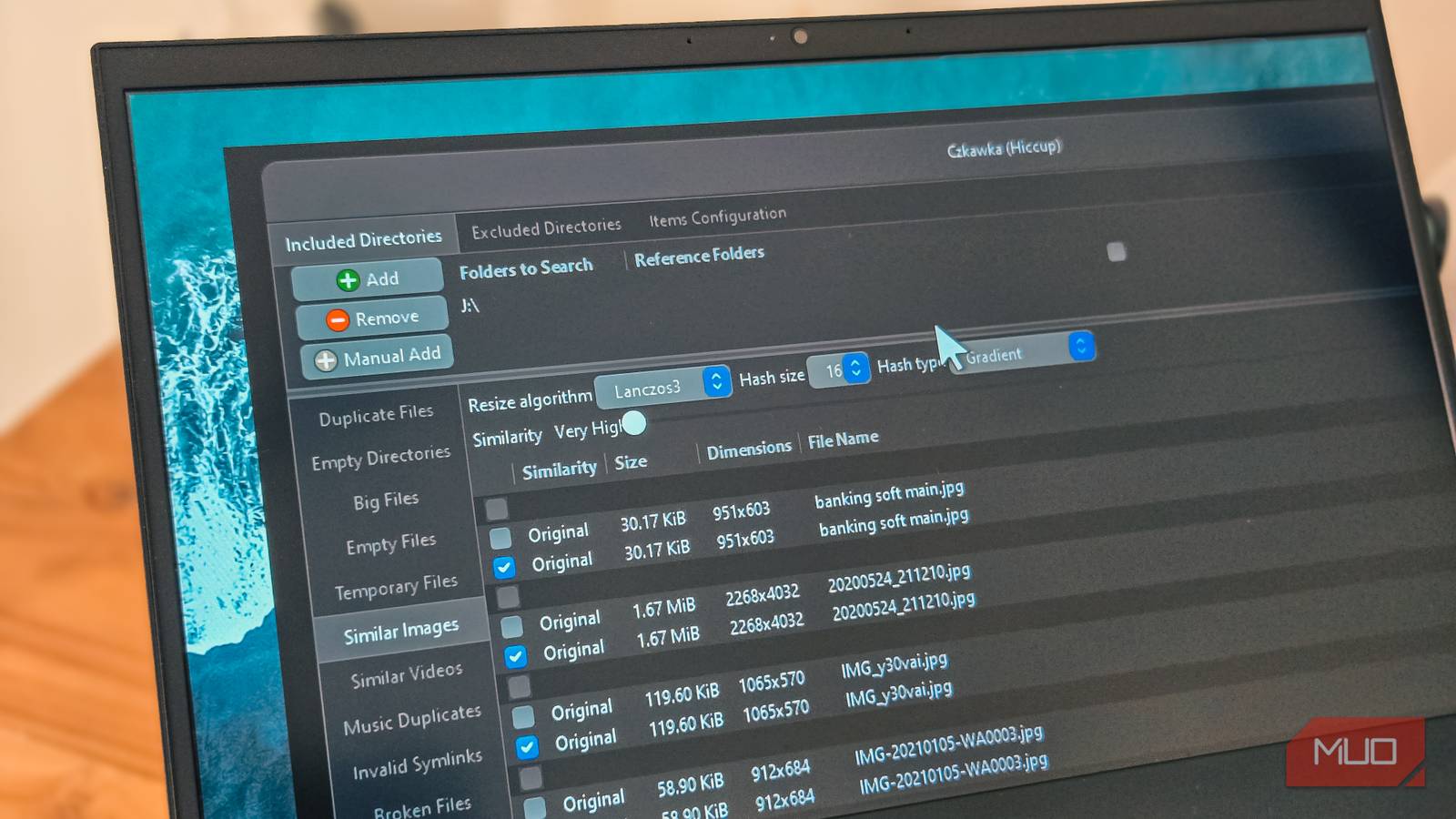
What makes it particularly useful for photo libraries is the Similar Images mode. This feature can detect visually similar photos even when they have different resolutions, file names, or compression levels. So if you saved the same photo from WhatsApp, Google Photos, and your phone's gallery, Czkawka will group them together regardless of the slight quality differences between them.
Beyond photos, Czkawka can also find duplicate music files by comparing audio content or tags, detect empty folders cluttering your directory structure, and identify temporary files left behind by apps. It's a multi-tool for disk cleanup rather than just a duplicate finder.
The app runs entirely offline with no telemetry or data collection, which is a nice bonus if you're cautious about privacy. It's available for Windows, Linux, and macOS, though the macOS installation is more involved and not beginner-friendly.
Installing and using Czkawka A portable app that requires no installationGetting Czkawka running on Windows is like installing any app from GitHub. So, head to the Czkawka GitHub repository, click on Releases, and download the Windows GUI archive from the Assets section. Unzip the file, open the extracted folder, and run czkawka_gui.exe to run the portable executable.
The app has a macOS-inspired interface with three main windows at the top. In Included Directories, you add the folders you want to scan for duplicates. I added my entire Pictures folder, which included years of phone backups scattered across multiple subfolders. If there are specific folders you want to skip, switch to the second tab and add them as excluded directories.
On the left side, you'll see different modes: Duplicate Files, Similar Images, Similar Videos, and Music Duplicates. For my photo cleanup, I started with Duplicate Files mode to catch exact copies, then ran Similar Images mode to find the near-duplicates that hash matching would miss.
 Tashreef Shareef / MakeUseOfCredit: Tashreef Shareef / MakeUseOf
After selecting a mode, click Search. Czkawka scanned my 160GB photo library in under two minutes on my SATA SSD, noticeably faster than other duplicate finders I've tried. The speed comes from Rust's performance optimizations and multithreaded scanning, so if you have a modern processor, expect quick results even on large folders.
The results showed up in grouped lists, with each group containing files that Czkawka determined to be duplicates or similar to each other. You can sort by file name, size, or path to help decide which version to keep. For photos, clicking an image in Similar Images mode shows a preview on the right, and pressing the Compare button opens a side-by-side view if you need a closer look.
To delete duplicates, you can manually tick files within each group or use the Select button for automatic rules like "Select all except oldest" or "Select all except biggest." Once you've made your selections, click Delete to remove them. Czkawka shows a confirmation dialog before doing anything permanent, which is good when you're about to delete thousands of files.
What you need to know Manual review is recommended for similar images Tashreef Shareef / MakeUseOfCredit: Tashreef Shareef / MakeUseOf
Czkawka is fast and capable; however, much like any cleanup utility, you should not use it blindly. The Similar Images mode groups photos based on visual similarity rather than exact matches, which means it can occasionally group images that look alike but aren't actually duplicates. For example, two screenshots taken seconds apart might end up in the same group even though they show different content.
Before I ran the cleanup, I made sure to have backups on separate drives. I'd recommend doing the same, because once files are deleted, they're gone. Moving duplicates to a temporary folder instead of deleting them outright is another safe approach if you want a chance to review before committing. The Move option in Czkawka lets you relocate files to a different folder rather than deleting them permanently.
The interface is locked to a dark theme with no light mode option, and some buttons can be hard to see depending on your display. It's a minor annoyance, but tooltips appear when you hover over options, which helps when you're exploring the settings for the first time. The default hash comparison method works well for most use cases, and I didn't need to change any of the advanced settings to get good results.
Czkawka cleaned up my photo library messAfter running both Duplicate Files and Similar Images modes, Czkawka found over 35,000 duplicate photos and 2,500 videos. Deleting these brought my photo library down from 210GB to just over 50GB, a reduction of nearly 70%. The final count was around 23,000 unique files, which feels much more reasonable for someone who doesn't take photos obsessively.
Czkawka isn't the only free tool that can wipe out duplicate files, but its combination of hash-based duplicate detection and visual similarity matching makes it particularly effective for photo libraries. If your storage keeps filling up and you suspect duplicates are making things difficult, Czkawka will not only show you exactly how bad the problem is, but also help you fix it.